Skills & Commands
Skills are reusable capabilities that activate based on trigger phrases in conversation. Slash commands are shortcuts that invoke specific skills or workflows. Prompts are reusable templates for multi-step operations.
Skills
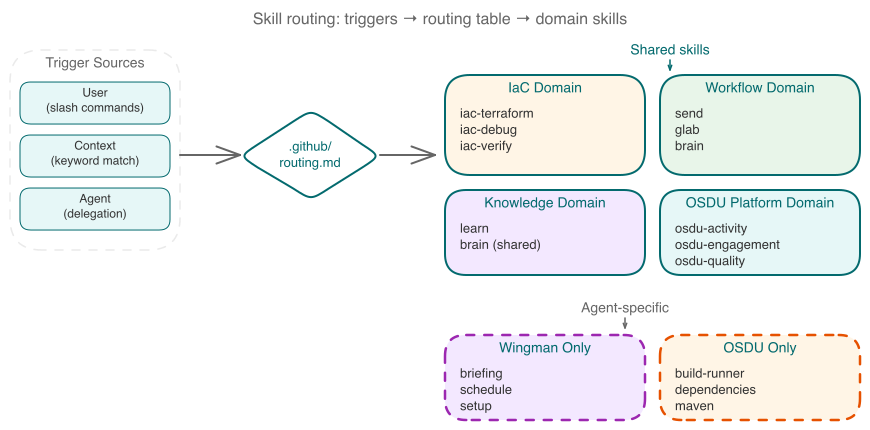
Shared Skills
Available to any agent context. Located in .github/skills/.
| Skill | Trigger Phrases | Description | Used By |
|---|---|---|---|
| brain | vault, brain, daily notes, reports, knowledge, decisions, remember | Read/write Obsidian vault — daily briefings, reports, decisions, knowledge curation | All |
| glab | GitLab, MRs, pipelines, glab commands | GitLab CLI expertise — self-hosted instances, pagination, MR/issue workflows | All |
| iac-terraform | Terraform, AVM, AKS, azd, infrastructure-as-code | Azure infrastructure patterns — AVM modules, Helm/Kustomize, safeguards compliance | Base, Wingman |
| iac-debug | Deployment failure, policy violation, debugging | Systematic root cause analysis — four-phase investigation process | Base, Wingman |
| iac-verify | Before claiming any task is complete | Evidence-based verification — cluster health, component checks, safeguards validation | Base, Wingman |
| learn | Learn, study, absorb, index knowledge | Knowledge acquisition from external sources — GitLab wikis, URLs, documentation | All |
| send | Ship, send, commit+push+MR workflow | Review-commit-push-MR workflow using worktrunk | Base, Wingman |
| osdu-activity | Pipeline status, MR activity, failed jobs | Platform monitoring via osdu-activity CLI — MRs, pipelines, issues | OSDU |
| osdu-engagement | Contributions, reviews, ADR engagement | Team contribution analysis via osdu-engagement CLI | OSDU |
| osdu-quality | Test reliability, flaky tests, pass rates | Test analysis via osdu-quality CLI — provider-specific results | OSDU |
Agent-Specific Skills
Skills that belong to a specific agent.
Wingman Skills (.ai-wingman/skills/):
| Skill | Description |
|---|---|
| briefing | Generates daily OSDU briefing notes — GitLab MRs + vault goals. Writes to .ai-brain/00-inbox/ |
| schedule | Cross-platform schedule management (macOS launchd, Windows Task Scheduler) for automated briefings |
| setup | Environment validation — repository tools, authentication, MCP servers, worktree layout |
OSDU Skills (.ai-osdu/skills/):
| Skill | Description |
|---|---|
| build-runner | Execute build/test commands (Maven, Node, Python) with structured summaries |
| dependencies | Multi-ecosystem dependency analysis — Trivy scanning, POM analysis, version checking |
| maven | Maven version checking and security vulnerability scanning |
How Skills Work
Skills are defined as SKILL.md files that contain:
- Trigger rules — context patterns that activate the skill
- Protocol — step-by-step instructions the agent follows
- Constraints — boundaries and rules (e.g., "never write directly to vault without using brain skill")
- Output format — expected response structure
Any context (base copilot, Wingman, or OSDU) can use shared skills. Agent-specific skills are only available within that agent's context.
Slash Commands
User-invocable commands that trigger specific workflows. Defined in .claude/commands/.
| Command | Description | Routes To |
|---|---|---|
/gm | Good morning — run the daily briefing protocol | Wingman → briefing skill |
/briefing | Run the daily briefing (same as /gm) | Wingman → briefing skill |
/send | Ship local changes: review, quality checks, commit, push, MR | send skill |
/brain | Read from or write to the Obsidian vault | brain skill |
/clone | Clone OSDU repositories into the workspace | clone prompt |
/debug | Investigate an infrastructure issue with systematic RCA | iac-debug skill |
/verify | Verify infrastructure work is complete with evidence | iac-verify skill |
/dep-scan | Run dependency analysis with risk scoring on an OSDU service | dependency-scan prompt |
/fossa | Fix a FOSSA NOTICE file from a failed MR pipeline | fossa prompt |
/maintainer | Maintainer actions for OSDU MRs — review or allow | maintainer prompt |
/remediate | Execute dependency remediation from an analysis report | remediate prompt |
Reusable Prompts
Multi-step workflow templates in .github/prompts/. These are invoked by slash commands or directly by agents.
| Prompt | File | Purpose |
|---|---|---|
| clone | clone.prompt.md | Clone OSDU GitLab repos using bare clone + worktree layout. Supports categories: libraries, core, reference, ingestion, domain |
| dependency-scan | dependency-scan.prompt.md | Comprehensive dependency analysis: discover, fetch, assess, distill, write vault notes |
| fossa | fossa.prompt.md | Fix FOSSA NOTICE file failures in GitLab MR pipelines — fetch child pipelines, extract URLs, download updated NOTICE |
| maintainer | maintainer.prompt.md | MR review (analyze changes, security, compliance) and trusted branch sync (allow action) |
| remediate | remediate.prompt.md | Execute dependency updates incrementally — risk-tiered: batch LOW, individual MEDIUM, research HIGH |
Risk-Tiered Remediation
The remediation workflow scores dependency updates by risk and processes them accordingly:
| Risk Level | Score | Strategy |
|---|---|---|
| LOW | 0-1 | Batch together, commit as a group |
| MEDIUM | 2-3 | Update individually, test each |
| HIGH | 4+ | Research first, consult before updating |
Risk factors include: package category (core vs dev), version jump type (patch/minor/major), known CVEs, and fix location (direct vs transitive).
See also
- Agents — which agents use which skills and how delegation works
- Knowledge Vault — how the
brainandlearnskills interact with the vault - Developer Workflows — end-to-end workflows built from these skills and commands