Deployment Model
cimpl-azure-provisioning deploys a complete OSDU platform on AKS Automatic using a layered Terraform architecture. This page covers the deployment lifecycle, namespace layout, and how the layers map to the repository structure.
Deployment Layers
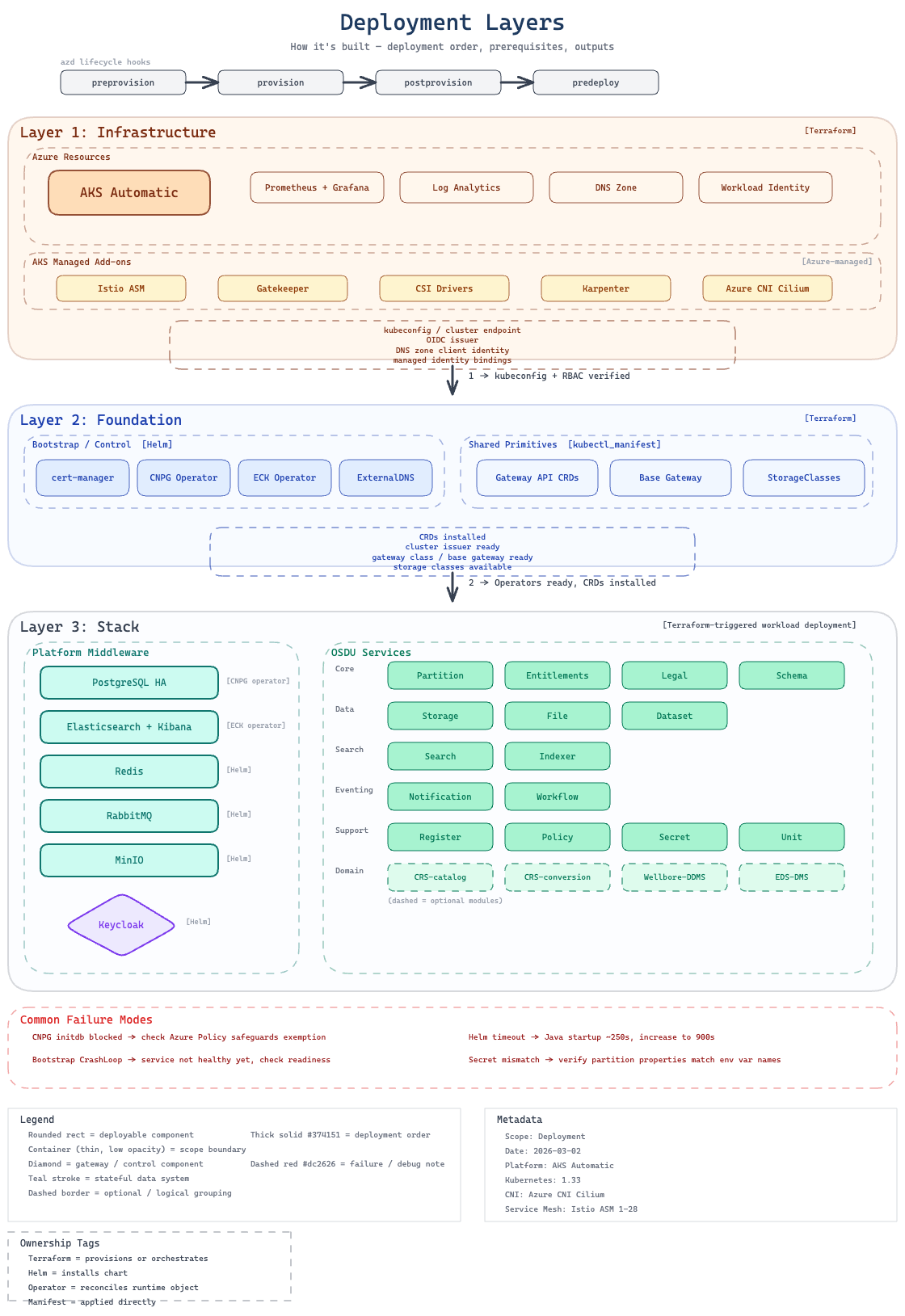
The deployment is split into four Terraform states, with an optional access-bootstrap layer separating privileged Azure authorization from core infrastructure:
| Layer | Directory | Deployed By | Purpose |
|---|---|---|---|
| 1. Cluster Infrastructure | infra/ | azd provision | AKS cluster, system node pool, monitoring workspaces, optional Grafana workspace, workload identities |
| 1.5 Access Bootstrap | infra-access/ | ./scripts/bootstrap-access.ps1 | AKS RBAC grants, policy exemptions, Grafana access, DNS role assignments |
| 2. Foundation | software/foundation/ | post-provision hook | Cluster-wide singletons: cert-manager, ECK operator, CNPG operator, ExternalDNS, Gateway API CRDs, StorageClasses |
| 3. Software Stack | software/stack/ | pre-deploy hook | Middleware instances (ES, PG, Redis, RabbitMQ, etc.) + all OSDU services |
Why this split? The AKS cluster must exist before any Kubernetes resources can be deployed. Foundation components (operators, CRDs, StorageClasses) are cluster-wide singletons that all stacks share. The software stack deploys middleware instances and OSDU services that can vary per stack. infra-access/ exists so privileged Azure authorization can be applied by a different identity without polluting the core infrastructure state.
Conceptual vs Terraform layers
Conceptually the architecture has three tiers: infrastructure, platform middleware, and OSDU services. In practice, middleware and OSDU services share a single Terraform state (software/stack/) because OSDU services have explicit depends_on relationships with middleware modules. The foundation layer was extracted to hold cluster-wide singletons that are independent of any individual stack.
Evolution
The original design used two Terraform states (see ADR-0003); the foundation layer was extracted later to improve lifecycle isolation.
Namespace Architecture
Resources are organized into namespaces with optional stack-id suffix for multi-stack support (see ADR-0017):
| Namespace | Contents | Istio Injection |
|---|---|---|
foundation | Cluster-wide operators (cert-manager, ECK, CNPG), Gateway CRDs, StorageClasses | N/A (operators) |
platform | Middleware instances: Elasticsearch, PostgreSQL, Redis, RabbitMQ, MinIO, Keycloak, Airflow | Enabled (STRICT mTLS, with pod-level opt-outs) |
osdu | OSDU common resources + all OSDU services | Enabled (STRICT mTLS) |
For named stacks (e.g., STACK_NAME=blue), namespaces become platform-blue and osdu-blue. The foundation namespace is shared across all stacks.
Multi-Stack Deployment
Multiple independent OSDU instances can run on the same cluster. Each stack gets its own platform-{name} and osdu-{name} namespaces with isolated middleware instances and OSDU services. The shared foundation layer (cert-manager, ECK operator, CNPG operator) serves all stacks.
# Deploy the default stack
azd deploy

# Deploy a second stack with a different name
azd env set STACK_NAME blue
azd deploy
Each stack maintains its own Terraform state, PostgreSQL cluster, Elasticsearch cluster, and OSDU service set. Cross-stack resources (CRDs, operators, StorageClasses) are managed once in the foundation layer.
Deployment Flow
The deployment lifecycle is orchestrated by Azure Developer CLI (azd) hooks. Each hook maps to a PowerShell script that manages a specific deployment phase:
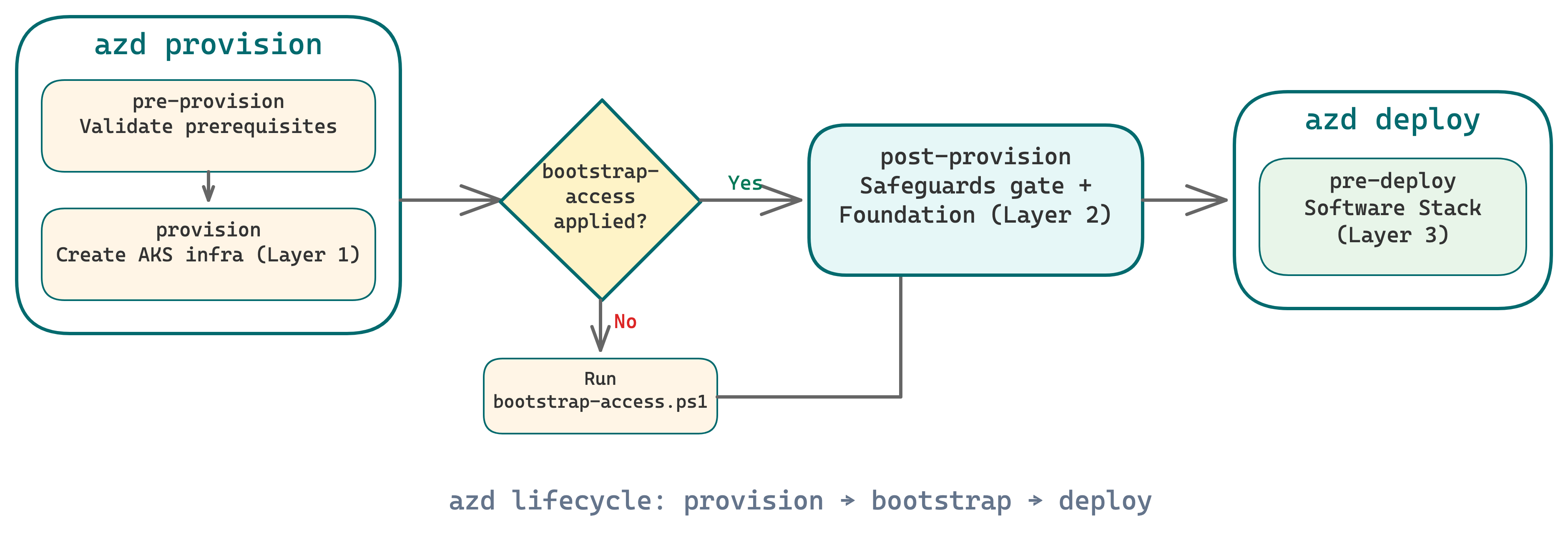
Why a gate? Azure Policy/Gatekeeper is eventually consistent. Fresh clusters have a window where policies aren't fully reconciled. The post-provision hook makes safeguards readiness an explicit gate before deploying any workloads (see ADR-0007).
Lifecycle Scripts
Each azd hook maps to a PowerShell script in scripts/. These scripts bridge the gap between azd's lifecycle model and the multi-layer Terraform architecture. Use this as a reference; most readers only need the deployment flow above.
| Script | azd Hook | Purpose | Key Environment Variables |
|---|---|---|---|
resolve-chart-versions.ps1 | prerestore | Query OCI registry for latest OSDU chart versions, write to .chart-versions.env | OSDU_CHART_VERSION |
pre-provision.ps1 | preprovision | Validate Azure CLI, Terraform, Helm prerequisites; auto-generate credentials if missing | CIMPL_INGRESS_PREFIX, OSDU_ADMIN_PASSWORD |
bootstrap-access.ps1 | (manual) | Apply infra-access/ Terraform — RBAC grants, policy exemptions, DNS roles, Grafana access | ARM_PRINCIPAL_ID, DNS_ZONE_* |
post-provision.ps1 | postprovision | Wait for safeguards readiness, then deploy foundation layer (software/foundation/) | AKS_NAME, RESOURCE_GROUP |
pre-deploy.ps1 | predeploy | Deploy software stack (software/stack/) — middleware + OSDU services | STACK_NAME, enable_* flags |
pre-down.ps1 | predown | Destroy software stack and foundation before cluster teardown | STACK_NAME |
post-down.ps1 | postdown | Clean up .terraform directories and stale state artifacts | — |
infra-access bootstrap
The bootstrap-access.ps1 script is run manually (not as an azd hook) because it requires elevated Azure permissions. It applies infra-access/ which grants AKS RBAC roles, creates the CNPG policy exemption, and optionally configures Grafana and DNS access. See ADR-0020.
External Access
When DNS and ingress are configured, the gateway module exposes multiple endpoints externally via HTTPS with automatic TLS certificates (cert-manager + Let's Encrypt):
| Endpoint | Hostname | Purpose |
|---|---|---|
| OSDU API | {prefix}.{zone} | Path-based routing to all enabled OSDU services (e.g., /api/partition/, /api/storage/) |
| Kibana | {prefix}-kibana.{zone} | Elasticsearch/Kibana dashboard |
| Keycloak | {prefix}-keycloak.{zone} | Identity provider admin console and token endpoint |
| Airflow | {prefix}-airflow.{zone} | DAG monitoring and task execution UI (optional) |
Each endpoint is optional, independently exposed, and backed by its own Gateway API HTTPS listener, HTTPRoute, TLS Certificate, and cross-namespace ReferenceGrants.
Repository Structure
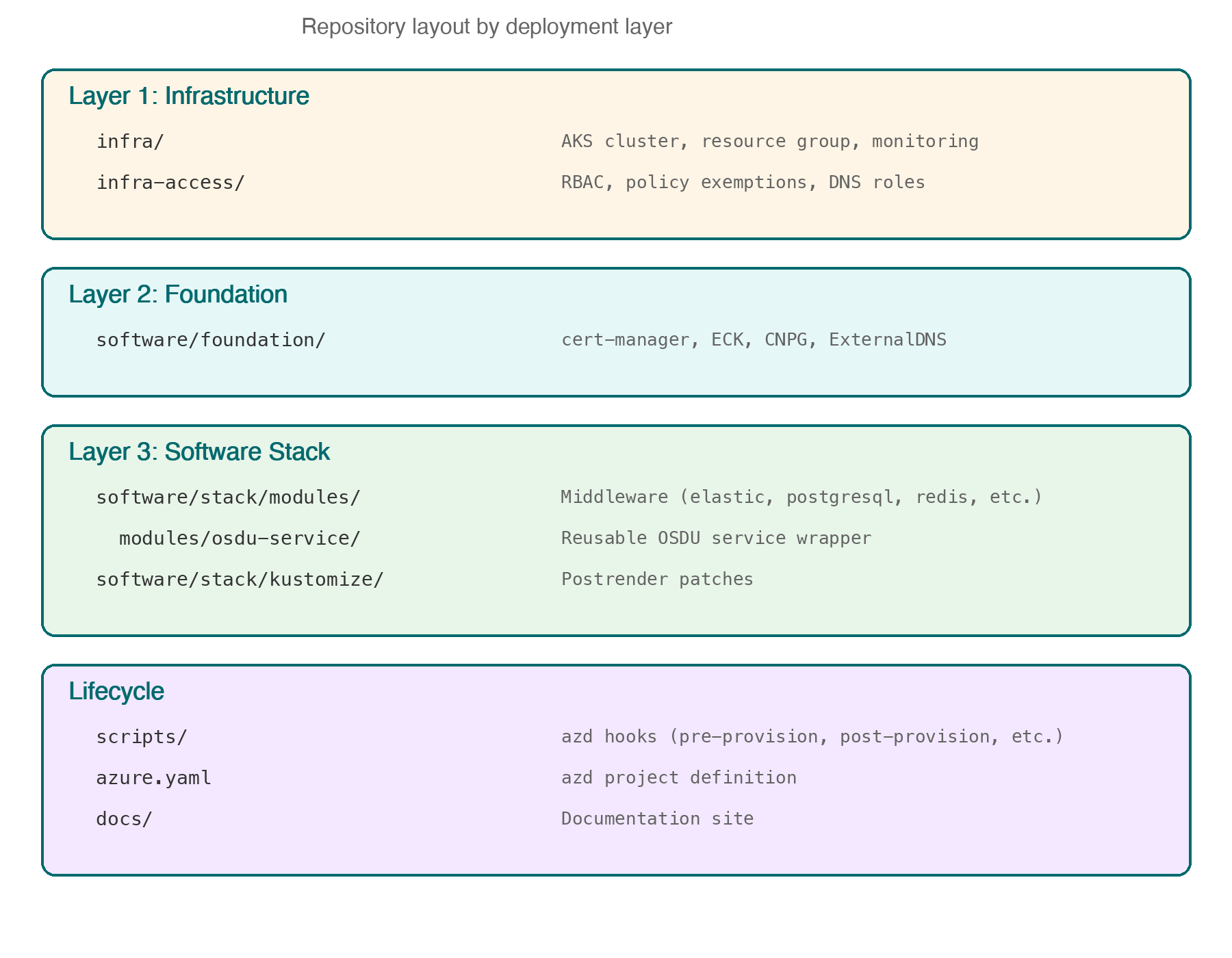
The repository layout mirrors the deployment layers. Each directory maps to a Terraform state with its own lifecycle.
See also
- Infrastructure — AKS Automatic, node pools, networking, and Azure resource configuration
- Platform Services — middleware components deployed on the cluster
- Service Architecture — how OSDU services are deployed, configured, and bootstrapped
- Agentic System — developer tooling: agents, skills, and automated workflows