Infrastructure
The infrastructure layer (infra/) provisions the contributor-safe AKS foundation. It owns cluster provisioning, node placement, networking, and baseline resource conventions. Privileged Azure authorization is split into infra-access/ so that contributors can operate infrastructure without elevated permissions. This is Layer 1 of the deployment model, separated from middleware and services so the platform foundation can evolve independently.
AKS Automatic
Why AKS Automatic?
AKS Automatic provides a managed Kubernetes experience with built-in best practices (see ADR-0002):
- Simplified operations: Auto-scaling, auto-upgrade, auto-repair
- Built-in best practices: Network policy, pod security, cost optimization
- Integrated Istio: Managed service mesh without manual installation
- Deployment Safeguards: Gatekeeper policies for compliance
These capabilities reduce the platform-assembly burden and give contributors a reproducible, secure baseline without manual cluster configuration.
# AKS Automatic with Istio
sku = { name = "Automatic", tier = "Standard" }
service_mesh_profile = { mode = "Istio" }
Terraform Resources
The infrastructure layer contains the core foundation, observability, and optional integrations:
azurerm_resource_group.main
module.aks (Azure Verified Module)
azurerm_monitor_workspace.prometheus
azurerm_dashboard_grafana.main (optional)
azurerm_user_assigned_identity.external_dns (optional)
Privileged Azure authorization resources such as AKS role assignments, Grafana access, DNS role assignments, and the CNPG policy exemption live in infra-access/ (see ADR-0020).
Zone Topology
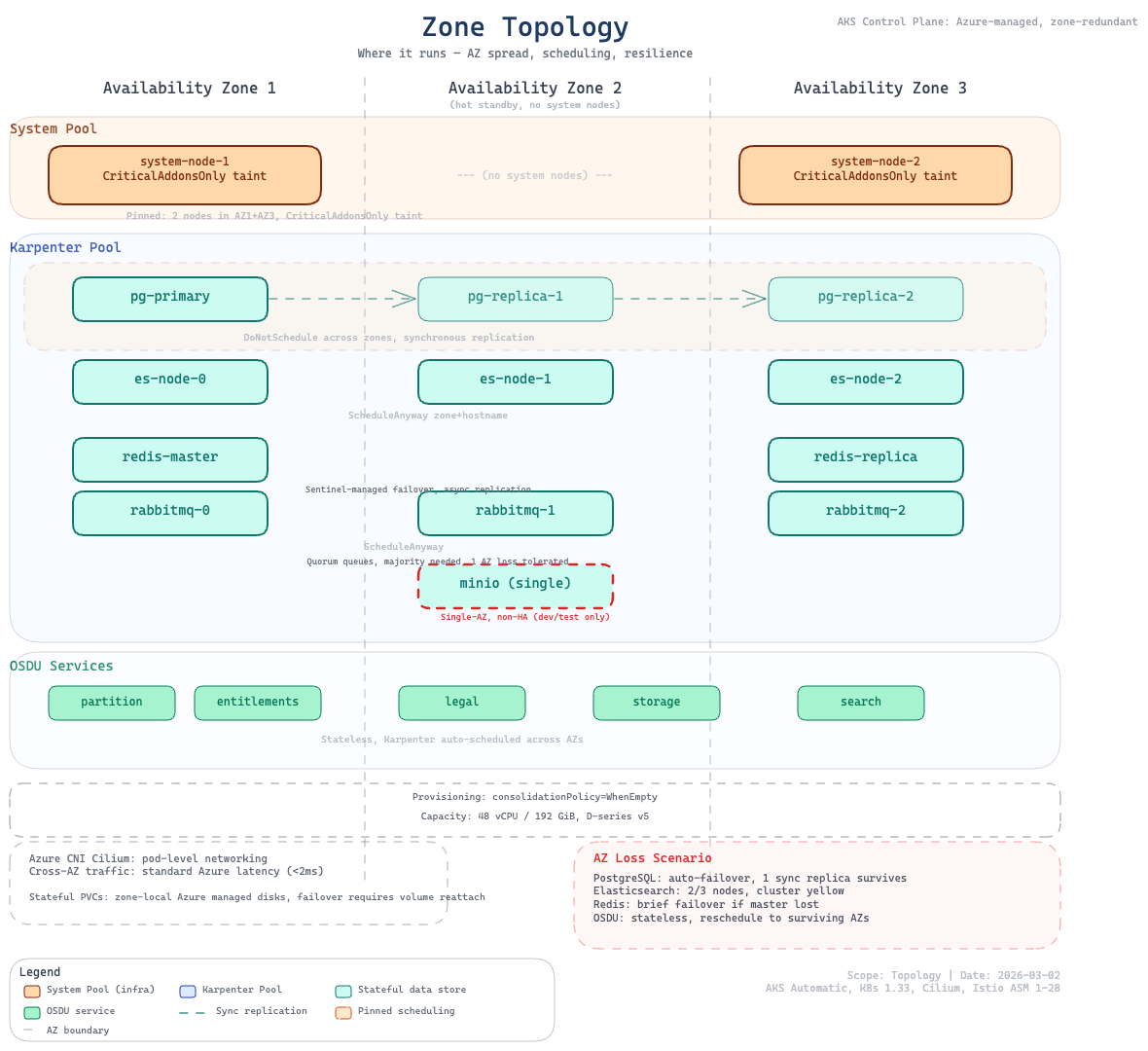
The cluster spreads workloads across Azure availability zones for high availability. The system node pool pins to configurable zones, while the platform node pool (Karpenter) dynamically selects from available zones. Stateful middleware is distributed across AZs for resilience, while OSDU services remain schedulable across surviving zones.
Node Pools
System components are pinned to reserved nodes, while platform and OSDU workloads run on auto-provisioned capacity that scales with demand.
| Pool | Purpose | VM Size | Count | Taints | Managed By |
|---|---|---|---|---|---|
| System | Critical system components | var.system_pool_vm_size (default: Standard_D4lds_v5) | 2 | CriticalAddonsOnly | AKS (VMSS) |
| Default | General workloads (MinIO, Airflow task pods) | Auto-provisioned | Auto | None | NAP (Karpenter) |
| Platform | Middleware + OSDU services | D-series (4-8 vCPU) | Auto | workload=platform:NoSchedule | NAP (Karpenter) |
System pool variables:
system_pool_vm_size: VM SKU for system nodes (default:Standard_D4lds_v5)system_pool_availability_zones: Zones for system nodes (default:["1", "2", "3"])
Why Karpenter (NAP) for Platform Workloads?
The platform node pool uses AKS Node Auto-Provisioning (NAP), powered by Karpenter, instead of a traditional VMSS-based agent pool (see ADR-0006):
- Eliminates
OverconstrainedZonalAllocationRequestfailures: Karpenter selects from multiple D-series VM SKUs per zone - Dynamic SKU selection: 4-8 vCPU VMs with premium storage support, best available option per zone
- Automatic scaling: Nodes provisioned on-demand and consolidated when empty
Workloads target these nodes via agentpool: platform nodeSelector and workload=platform:NoSchedule toleration. The Karpenter NodePool and AKSNodeClass CRDs are deployed in software/stack/platform.tf.
Network Architecture
Network Configuration
Network Plugin:      Azure CNI Overlay
Network Dataplane:   Cilium
Outbound Type:       Managed NAT Gateway
Service CIDR:        10.0.0.0/16
DNS Service IP:      10.0.0.10
Network Security
Networking is designed for scale, controlled egress, and encrypted east-west traffic.
- Azure CNI Overlay: Pod IPs in overlay network, no VNet subnet exhaustion
- Cilium: eBPF-based network policy enforcement
- Managed NAT Gateway: Outbound traffic via dedicated NAT
- Istio mTLS: STRICT mode for east-west traffic (see Security)
Resource Naming and Tagging
Consistent naming and tags support ownership tracking, cost allocation, and multi-environment operations.
Naming Convention
All resources follow the pattern: <prefix>-<project>-<environment>
| Resource | Pattern | Example |
|---|---|---|
| Resource Group | rg-cimpl-<env> | rg-cimpl-dev |
| AKS Cluster | cimpl-<env> | cimpl-dev |
| Namespaces | platform, osdu (with optional stack suffix) | platform-blue, osdu-blue |
Tagging Strategy
All Azure resources include:
| Tag | Value |
|---|---|
azd-env-name | Environment name |
project | cimpl |
Contact | Owner email address |
See also
- Deployment Model — how infrastructure fits into the four-layer architecture
- Platform Services — middleware deployed on top of this infrastructure
- Security — Azure RBAC, workload identity, and network security details