Service Architecture
This page documents how OSDU services are deployed, configured, and bootstrapped within the cimpl-azure-provisioning stack. It covers the reusable Terraform module pattern, the Helm + Kustomize postrender framework, feature flags, and the service dependency chain.
Reusable OSDU Service Module
Each OSDU service is deployed via the modules/osdu-service/ wrapper module (see ADR-0015). This standardizes:
- Helm release creation with OCI chart reference
- Kustomize postrender integration
- Timeout and retry configuration
- Chart version management
A typical service definition is ~20 lines in the calling .tf file:
module "partition" {
  source = "./modules/osdu-service"
  count  = var.enable_partition ? 1 : 0

  name            = "partition"
  namespace       = local.osdu_namespace
  chart_version   = local.osdu_versions["partition"]
  kustomize_dir   = "${path.module}/kustomize/services/partition"
  # ... values and dependencies
}
Module Organization
| Layer | Path | Contents |
|---|---|---|
| Foundation (Layer 2) | software/foundation/charts/cert-manager/ | cert-manager + ClusterIssuers |
| Foundation (Layer 2) | software/foundation/charts/elastic/ | ECK operator |
| Foundation (Layer 2) | software/foundation/charts/cnpg/ | CNPG operator |
| Foundation (Layer 2) | software/foundation/charts/external-dns/ | ExternalDNS |
| Stack (Layer 3) | software/stack/modules/elastic/ | Elasticsearch + Kibana CRs + bootstrap |
| Stack (Layer 3) | software/stack/modules/postgresql/ | PostgreSQL cluster + DDL bootstrap |
| Stack (Layer 3) | software/stack/modules/redis/ | Bitnami Redis chart |
| Stack (Layer 3) | software/stack/modules/rabbitmq/ | Raw K8s manifests (StatefulSet, Services, ConfigMap) |
| Stack (Layer 3) | software/stack/modules/minio/ | MinIO Helm chart |
| Stack (Layer 3) | software/stack/modules/keycloak/ | Raw K8s manifests (StatefulSet, realm import) |
| Stack (Layer 3) | software/stack/modules/airflow/ | Apache Airflow official chart |
| Stack (Layer 3) | software/stack/modules/gateway/ | Gateway API resources + TLS certificates |
| Stack (Layer 3) | software/stack/modules/osdu-common/ | OSDU namespace, ConfigMaps, secrets, mTLS policy |
| Stack (Layer 3) | software/stack/modules/osdu-service/ | Reusable wrapper for individual OSDU Helm releases |
Helm + Kustomize Postrender
All Helm charts are deployed with a Kustomize postrender to ensure AKS safeguards compliance (see ADR-0004).
How It Works
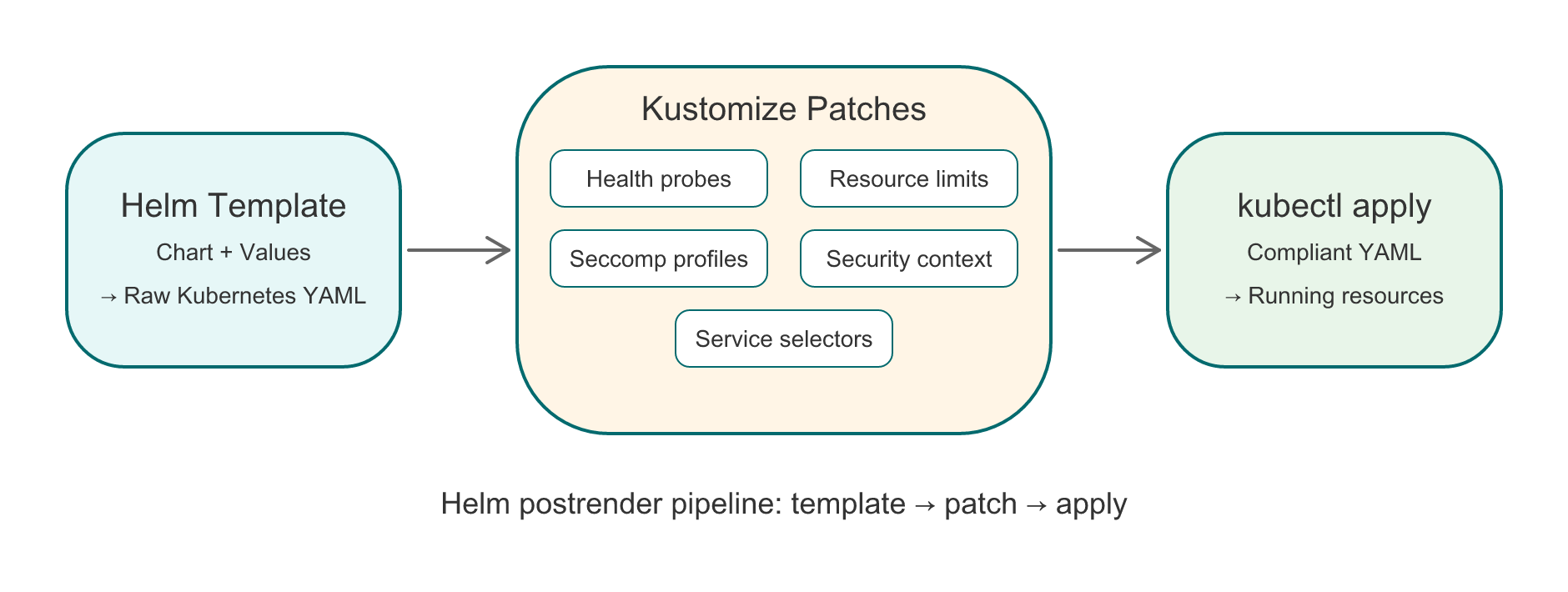
The postrender pipeline transforms Helm output before it reaches the cluster:
| Step | Input | Action | Output |
|---|---|---|---|
| 1. Helm template | Chart + values | Render Kubernetes manifests | Raw YAML |
| 2. Kustomize patches | Raw YAML + patches | Add probes, resources, seccomp, security context, selectors | Compliant YAML |
| 3. kubectl apply | Compliant YAML | Apply to cluster | Running resources |
Kustomize patches are organized per component:
| Directory | Patches |
|---|---|
kustomize/middleware/elastic/ | ECK operator probes |
kustomize/middleware/airflow/ | Airflow chart probes + security |
kustomize/services/partition/ | Partition service probes |
kustomize/services/entitlements/ | Entitlements service probes |
kustomize/services/<name>/ | Per-service patches |
Each directory contains a kustomization.yaml with strategic merge patches targeting specific Deployments (by type=core label for OSDU services).
OSDU Service Probes
OSDU Java services use Spring Boot actuator on management port 8081:
- Liveness:
/health/livenesson port 8081 - Readiness:
/health/readinesson port 8081 initialDelaySeconds: 150-250(Java startup time)
Warning
Probes must target type=core Deployments only. OSDU charts include both a main app (type: core) and a bootstrap container (type: bootstrap). Patching bootstrap containers with health probes will break them.
Feature Flag System
All middleware and OSDU services are controlled by enable_* boolean variables defined in software/stack/variables-flags-*.tf.
Design Principles
- Opt-out model: Everything defaults to enabled. Set
TF_VAR_enable_<component>=falseto disable. - Two-level control: Group flags (
enable_osdu_core_services,enable_osdu_reference_services,enable_osdu_domain_services) disable entire capability blocks. Individual flags (enable_partition,enable_search, etc.) provide fine-grained opt-out within a group. See ADR-0019. - Cascading locals:
locals.tfcomputeslocal.deploy_*for each service asgroup_flag && individual_flag. Resource files referencelocal.deploy_*instead ofvar.enable_*for OSDU services. Platform middleware flags remain direct variable references. - Dependency cascade: Reference and domain groups require core. Disabling core automatically disables downstream groups.
- Clean environment: No need to set flags for the default deployment.
Example
# Deploy platform middleware only — no OSDU services
azd env set TF_VAR_enable_osdu_core_services false

# Or disable specific middleware and let dependency chains propagate
azd env set TF_VAR_enable_elasticsearch false
# Search and Indexer won't deploy since they depend on Elasticsearch
Service Dependency Chain
OSDU services form a dependency graph. Terraform's depends_on and conditional count guards enforce the correct deployment order:
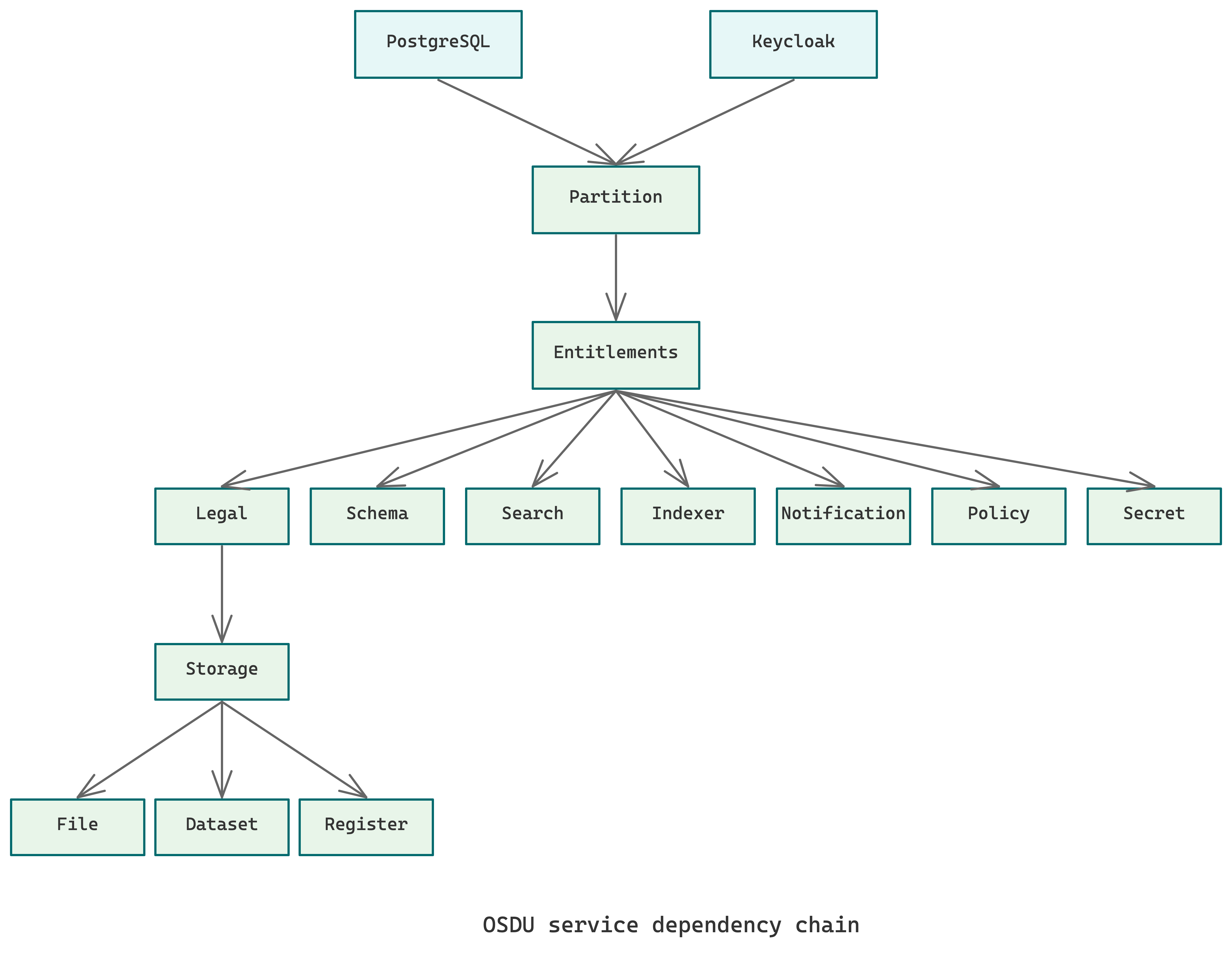
Each service waits for its dependencies to be healthy before deploying. Bootstrap containers call upstream APIs to seed initial data (e.g., Partition bootstrap registers the osdu data partition with all middleware endpoints).
CNPG Database Bootstrapping
PostgreSQL databases are bootstrapped using a CNPG initdb script that creates 14 separate databases (12 for OSDU services + 2 for platform components), matching the ROSA topology (see ADR-0014):
| Category | Databases |
|---|---|
| OSDU core | partition, entitlements, legal, schema, storage, file, dataset, register, workflow |
| OSDU domain | seismic, reservoir, well_delivery |
| Non-OSDU | keycloak, airflow |
Each database has a service-specific schema with the standard OSM table pattern: (id text, pk bigint IDENTITY, data jsonb NOT NULL) + GIN index.
A shared osdu user owns all OSDU databases, a simplification from ROSA's per-service user model.
Bootstrap Sequence
After services are deployed, bootstrap containers seed initial data:
- Partition bootstrap — Registers the
osdudata partition with all middleware endpoints (PostgreSQL, Elasticsearch, Redis, RabbitMQ, MinIO) - Entitlements bootstrap — Acquires a token from Keycloak (
datafierclient) and provisions tenant entitlements groups via the Entitlements API - Per-service bootstrap (if applicable) — Seeds service-specific reference data
Info
Bootstrap containers run as Kubernetes Deployments (type=bootstrap) that call the service API. They require the target service to be healthy AND the database tables to exist.
Chart Version Management
OSDU services use CIMPL Helm charts from the OCI registry with chart-default images (see ADR-0013):
# Default version for all services
variable "osdu_chart_version" {
  default = "0.0.7-latest"
}

# Per-service overrides
variable "osdu_service_versions" {
  type    = map(string)
  default = {}
}
Tip
Don't override chart images. CIMPL Helm charts have correct default images with pinned tags. ROSA reference overrides use different tags that may not exist.
Secrets and Configuration
OSDU services discover middleware via Kubernetes secrets created by the osdu-common module:
| Secret | Service | Key Fields |
|---|---|---|
partition-postgres-secret | Partition | OSM_POSTGRES_URL, OSM_POSTGRES_USERNAME, OSM_POSTGRES_PASSWORD |
entitlements-multi-tenant-postgres-secret | Entitlements | ENT_PG_URL_SYSTEM, ENT_PG_USER_SYSTEM, ENT_PG_PASS_SYSTEM |
wellbore-postgres-secret | Wellbore | OSM_POSTGRES_URL, OSM_POSTGRES_USERNAME, OSM_POSTGRES_PASSWORD |
datafier-secret | Entitlements bootstrap | OPENID_PROVIDER_CLIENT_ID, OPENID_PROVIDER_CLIENT_SECRET, OPENID_PROVIDER_URL |
entitlements-redis-secret | Entitlements | REDIS_PASSWORD |
Secret key names align with ROSA conventions (see ADR-0014).
Adding a New Service
To add a new OSDU service to the stack:
-
Create the module call in the appropriate
.tffile (osdu-services-core.tf,osdu-services-reference.tf, orosdu-services-domain.tf): -
Add the feature flag in the matching
variables-flags-*.tffile: -
Add the cascading local in
locals.tf: -
Create Kustomize patches in
kustomize/services/new-service/:kustomization.yamlwith strategic merge patch- Probe injection targeting
type=coreDeployments - Resource limits, seccomp profile, security context
-
Add the database (if needed) to the CNPG
initdbscript inmodules/postgresql/ -
Add secrets (if needed) to
modules/osdu-common/for middleware credentials -
Wire dependencies using
depends_onto ensure upstream services are healthy -
Add the chart version to the
osdu_versionslocal map inlocals.tf
Developer tooling
The Agentic System includes skills for debugging deployments (/debug), verifying completeness (/verify), and shipping changes (/send). See Developer Workflows for the full toolkit.